


Agentforce Marketingで近未来の顧客体験デモを作ってみた 【3】
実装内容(2)
*今回実装内容を含むので、Agent自体を指す場合と製品名で混同しやすくなる事態を避けるため、製品名は旧来のものを使用しています。(あとSEO目的も少しある)
*また、今回あくまでもデモ用なので、わたし自身 Gemini3.0 に相談しながらあたかもペアプロをしているかのように作っていきました。設定詳細を省略している部分については適宜Gemini他、Google等で調査の上でご実施いただければと思います。
オブジェクト設定
前章までで初期準備が終わったので、ここから今回のデモ用に必要なリソースを構築していきます。
以下のカスタムオブジェクトを作成します。
A. 商品 (Product__c)
ECサイトと店舗の在庫、商品情報を管理するマスタ。
・Product_ID__c: 商品ID (URLパラメータとの照合用一意識別子)
・Color__c: 色 (Red, Blue, Blackなど)
・Size__c: サイズ (26.5, 27.0など)
・ImageUrl__c: 商品画像のURL
・EC_Stock__c: EC在庫数 (数値)
・Store_Stock__c: 店舗在庫数 (数値)
・Store_Name__c: 在庫がある店舗名
B. 店舗 (Store__c)
実店舗の情報。Apexでの距離判定ロジックで使用。
・Address__c: 住所 (都道府県・市区町村)
C. 来店予約 (Store_Visit_Reservation__c)
Chat Agent経由で作成される予約データ。
・Store_Name__c: 予約店舗名 (テキスト または Store__c参照)
・Reservation_Date__c:予約日時 (日時型)
・Status__c: ステータス (予約確定, キャンセルなど)
D. Agentメッセージログ (Agent_Message_Log__c)
Web上のAgentの動きをCRMのタイムラインに可視化するためのログオブジェクト。
・Message_Content__c: アクション内容 (例: SHOW_TARGET_PRODUCT, BOOKED_APPOINTMENT)
・RProduct_Id__c:関連商品ID
・Timeline_Title__c: (数式) タイムライン表示用タイトル (例: “EC商品閲覧”, “AI提案”などをアイコン付きで表示)
続いて以下の標準オブジェクトも更新します。
・Foot_Size__c: 足のサイズ (商品マッチング用)
・MailingAddress: 標準住所 (店舗との距離判定用)
・ケース (Case)
・Conversation_Summary__c: (リッチテキスト) AI要約の保存先
Server-Sideロジック作成(Apex)
データを入れる箱が用意できたら、ここからはその箱の中にデータを入れるロジックを作っていきます。
サーバーサイドで処理するApex Classを作成します。この処理はAgentから呼ばれるフローからも実行され、また、クライアント(ブラウザ上のLWC)からも参照されます。
コード全文を貼っておきます。指定商品のうちEC在庫が一番多いSKUをひとつ返すFunctionや、カラバリを表示するためのFunction、来店予約リクエストを記録するFunctionなどが作成されています。
public without sharing class AgentPageUpdater {

    // --- パラメータ定義 ---
    public class LogRequest {
        @InvocableVariable(label='Message Content' required=true) public String message;
        @InvocableVariable(label='Customer ID' required=true) public String customerId;
        @InvocableVariable(label='Product ID (Optional)' required=false) public String productId;
    }

    public class LogResult {
        @AuraEnabled public String message;
        @AuraEnabled public String productId;
    }

    public class StoreAvailability {
        @AuraEnabled public String storeName;
        @AuraEnabled public Decimal stockCount;
        @AuraEnabled public String customerCity;
        @AuraEnabled public String productImageUrl;
        @AuraEnabled public String productName;
        @AuraEnabled public String productColor;
    }

    // --- Flow用メソッド ---
    @InvocableMethod(label='Update Website Page')
    public static void publishMessageToPage(List<LogRequest> requests) {
        List<Agent_Message_Log__c> logsToInsert = new List<Agent_Message_Log__c>();
        for (LogRequest req : requests) {
            Agent_Message_Log__c newLog = new Agent_Message_Log__c(
                Message_Content__c = req.message,
                CustomerId__c = req.customerId,
                Contact__c = req.customerId, // ★ここを追加 (Lookup項目にもIDを入れる)
                Product_Id__c = req.productId
            );
            logsToInsert.add(newLog);
        }
        if (!logsToInsert.isEmpty()) insert logsToInsert;
    }

    // --- LWC用メソッド ---

    @AuraEnabled
    public static LogResult getLatestMessage(String customerId) {
        List<Agent_Message_Log__c> logs = [
            SELECT Message_Content__c, Product_Id__c
            FROM Agent_Message_Log__c
            WHERE CustomerId__c = :customerId
            ORDER BY CreatedDate DESC
            LIMIT 1
        ];
        if (logs.isEmpty()) return null;
        LogResult res = new LogResult();
        res.message = logs[0].Message_Content__c;
        res.productId = logs[0].Product_Id__c;
        return res;
    }

    // ★修正: customerIdを受け取り、サイズで絞り込んで在庫が多い順に返す
    @AuraEnabled(cacheable=true)
    public static Product__c getBestStockProduct(String customerId, String targetProductId) {
        String targetSizeString = getCustomerSize(customerId);

        List<Product__c> products = [
            SELECT Id, Name, ImageUrl__c, Size__c, Color__c, EC_Stock__c
            FROM Product__c
            WHERE Product_Id__c = :targetProductId
              AND Size__c = :targetSizeString // ★サイズ指定
            ORDER BY EC_Stock__c DESC
            LIMIT 1
        ];
        return products.isEmpty() ? null : products[0];
    }

    @AuraEnabled(cacheable=true)
    public static List<Product__c> getRecommendedProducts(String customerId) {
        String targetSizeString = getCustomerSize(customerId);
        return [SELECT Id, Name, ImageUrl__c, Size__c, Color__c, EC_Stock__c FROM Product__c WHERE Size__c = :targetSizeString LIMIT 3];
    }

    @AuraEnabled(cacheable=true)
    public static List<Product__c> getColorVariations(String customerId, String productId) {
        String targetSizeString = getCustomerSize(customerId);
        return [
            SELECT Id, Name, ImageUrl__c, Size__c, Color__c, EC_Stock__c
            FROM Product__c
            WHERE Product_Id__c = :productId
              AND Size__c = :targetSizeString
            LIMIT 4
        ];
    }

    // ★修正: サイズで絞り込み、かつ在庫が少ない順(ASC)に返す=売り切れ品ヒット狙い
    @AuraEnabled
    public static StoreAvailability checkStoreAvailability(String customerId, String productId) {
        StoreAvailability info = new StoreAvailability();

        // 住所取得
        List<Contact> contacts = [SELECT MailingAddress FROM Contact WHERE Id = :customerId LIMIT 1];
        String city = 'Tokyo';
        if (!contacts.isEmpty() && contacts[0].MailingAddress != null) {
            city = String.valueOf(contacts[0].MailingAddress);
        }
        info.customerCity = city;

        // 店舗判定
        if (city != null && (city.contains('Yokohama') || city.contains('横浜') || city.contains('Kanagawa'))) {
            info.storeName = '横浜店';
        } else {
            info.storeName = '新宿店';
        }

        // サイズ取得
        String targetSizeString = getCustomerSize(customerId);

        // 商品取得 (サイズ一致 かつ 在庫昇順)
        List<Product__c> products = [
            SELECT Shop_Stock_Shinjuku__c, Shop_Stock_Yokohama__c, ImageUrl__c, Name, Color__c, EC_Stock__c
            FROM Product__c
            WHERE Product_Id__c = :productId
              AND Size__c = :targetSizeString // ★サイズ指定
            ORDER BY EC_Stock__c ASC
            LIMIT 1
        ];

        if (!products.isEmpty()) {
            info.productImageUrl = products[0].ImageUrl__c;
            info.productName = products[0].Name;
            info.productColor = products[0].Color__c;

            if (info.storeName == '横浜店') {
                info.stockCount = products[0].Shop_Stock_Yokohama__c;
            } else {
                info.stockCount = products[0].Shop_Stock_Shinjuku__c;
            }
        } else {
            info.stockCount = 0;
        }

        return info;
    }

    @AuraEnabled
    public static void createAppointment(String customerId, String requestedDate, String storeName) {
        Store_Visit_Reservation__c reservation = new Store_Visit_Reservation__c(
            Contact__c = customerId,
            Reservation_Date__c = requestedDate,
            Store_Name__c = storeName,
            Status__c = 'Requested'
        );
        insert reservation;
    }

    // サイズ取得ロジックの共通化
    private static String getCustomerSize(String customerId) {
        List<Contact> contacts = [SELECT FootSize__c FROM Contact WHERE Id = :customerId LIMIT 1];
        Decimal sizeDecimal = 23.5;
        if (!contacts.isEmpty() && String.isNotBlank(contacts[0].FootSize__c)) {
            try { sizeDecimal = Decimal.valueOf(contacts[0].FootSize__c); } catch (Exception e) {}
        }
        return String.valueOf(sizeDecimal);
    }
}
Client-Sideロジック作成(LWC)
続いて、クライアントサイドの実装です。ここでは、Agentの応答と連動し、ページ内コンテンツを差し替えるための本丸の実装、LWCを作成します。
以下コードをVSCodeで書いて、SalesforceのExtensionでSDO環境にデプロイしました(Apexも同時)。
【HTML】<template> <div class="slds-box slds-theme_default"> <h2 class="slds-text-heading_medium slds-m-bottom_small slds-text-align_center"> <template if:true={showSingleProduct}>おすすめ商品</template> <template if:true={showRecommendations}>あなたへのおすすめ</template> <template if:true={showColorVariations}>カラーバリエーション</template> <template if:true={showAppointmentForm}>来店予約</template> </h2> <template if:true={showSingleProduct}> <div class="slds-align_absolute-center"> <article class="slds-card slds-p-around_medium slds-text-align_center slds-size_1-of-2"> <div class="slds-m-bottom_medium"> <span class="slds-badge slds-theme_success">ベストセラー</span> </div> <div class="slds-m-bottom_small"> <img src={singleProduct.ImageUrl__c} alt={singleProduct.Name} style="height:250px; object-fit:contain;"/> </div> <h3 class="slds-text-heading_large">{singleProduct.Name}</h3> <p class="slds-text-heading_small slds-m-top_small">カラー: {singleProduct.Color__c}</p> <div class="slds-m-top_small"> <p class="slds-text-heading_small"> EC在庫: <strong>{singleProduct.EC_Stock__c}</strong> </p> </div> </article> </div> </template> <template if:true={showColorVariations}> <div class="slds-grid slds-gutters slds-wrap"> <template for:each={products} for:item="product"> <div key={product.Id} class="slds-col slds-size_1-of-2 slds-m-bottom_small"> <article class="slds-card slds-p-around_small slds-text-align_center"> <div class="slds-m-bottom_small"> <img src={product.ImageUrl__c} alt={product.Name} style="height:180px; object-fit:contain;"/> </div> <h3 class="slds-text-heading_small">{product.Name}</h3> <p class="slds-text-body_regular slds-text-color_success">{product.Color__c}</p> <div class="slds-m-top_x-small"> <template if:true={product.hasStock}> <p class="slds-text-body_small">EC在庫: {product.EC_Stock__c}</p> </template> <template if:false={product.hasStock}> <p class="slds-text-body_small slds-text-color_error slds-text-title_bold">在庫切れ</p> </template> </div> </article> </div> </template> </div> </template> <template if:true={showRecommendations}> <div class="slds-grid slds-gutters slds-wrap"> <template for:each={products} for:item="product"> <div key={product.Id} class="slds-col slds-size_1-of-3"> <article class="slds-card slds-p-around_small slds-text-align_center"> <div class="slds-m-bottom_small"> <img src={product.ImageUrl__c} alt={product.Name} style="height:150px; object-fit:contain;"/> </div> <h3 class="slds-text-heading_small">{product.Name}</h3> <p class="slds-text-body_small">{product.Color__c} / {product.Size__c}</p> </article> </div> </template> </div> </template> <template if:true={showAppointmentForm}> <div class="slds-p-around_medium slds-box slds-theme_shade"> <div class="slds-align_absolute-center slds-m-bottom_medium"> <article class="slds-card slds-p-around_small slds-text-align_center" style="background-color: white; width: 60%;"> <img src={storeInfo.imageUrl} alt={storeInfo.productName} style="height:150px; object-fit:contain;"/> <p class="slds-m-top_x-small slds-text-heading_small">{storeInfo.productName}</p> <p class="slds-text-body_small">{storeInfo.productColor}</p> </article> </div> <div class="slds-text-align_center slds-m-bottom_medium slds-p-bottom_small slds-border_bottom"> <h3 class="slds-text-heading_small slds-m-bottom_x-small"> 在庫のある近隣店舗が見つかりました </h3> <div class="slds-box slds-box_x-small slds-theme_default slds-size_2-of-3 slds-align_absolute-center"> <p class="slds-text-heading_medium"> <span class="slds-icon_container slds-icon-standard-store" title="Store"> 🏠 </span> {storeInfo.name} </p> <p class="slds-m-top_x-small"> 店舗在庫: <strong class="slds-text-color_success">{storeInfo.stock}</strong> 点 </p> </div> </div> <p class="slds-m-bottom_medium slds-text-align_center"> オンラインストアでは在庫切れです。<br/> <b>{storeInfo.name}</b> にて試着・購入のご予約を承ります。 </p> <div class="slds-form-element"> <label class="slds-form-element__label" for="date-input">希望日時</label> <div class="slds-form-element__control"> <input type="datetime-local" id="date-input" class="slds-input" onchange={handleDateChange}/> </div> </div> <div class="slds-align_absolute-center slds-m-top_medium"> <button class="slds-button slds-button_brand" onclick={submitReservation}>予約を確定する</button> </div> </div> </template> </div> </template>
【JS】
import { LightningElement, track } from 'lwc';
import getLatestMessage from '@salesforce/apex/AgentPageUpdater.getLatestMessage';
import getRecommendedProducts from '@salesforce/apex/AgentPageUpdater.getRecommendedProducts';
import getBestStockProduct from '@salesforce/apex/AgentPageUpdater.getBestStockProduct';
import getColorVariations from '@salesforce/apex/AgentPageUpdater.getColorVariations';
import checkStoreAvailability from '@salesforce/apex/AgentPageUpdater.checkStoreAvailability';
import createAppointment from '@salesforce/apex/AgentPageUpdater.createAppointment';

export default class AdaptiveWebsite extends LightningElement {
    @track products = [];
    @track singleProduct = null;

    @track showRecommendations = false;
    @track showSingleProduct = false;
    @track showColorVariations = false;
    @track showAppointmentForm = false;

    @track storeInfo = {
        name: '',
        stock: 0,
        city: '',
        imageUrl: '',
        productName: '',
        productColor: ''
    };

    receivedMessage = 'エージェントの応答を待っています...';
    intervalId;
    customerId;
    currentProductId;
    reservationDate = '';

    connectedCallback() {
        const urlParams = new URLSearchParams(window.location.search);
        this.customerId = urlParams.get('customer_id');
        const urlProductId = urlParams.get('product_id');

        if (urlProductId) {
            this.currentProductId = urlProductId;
            this.fetchBestProduct(urlProductId);
        }

        if (this.customerId) {
            this.startPolling();
        }
    }

    disconnectedCallback() {
        if (this.intervalId) clearInterval(this.intervalId);
    }

    startPolling() {
        this.checkMessage();
        this.intervalId = setInterval(() => this.checkMessage(), 3000);
    }

    checkMessage() {
        getLatestMessage({ customerId: this.customerId })
            .then(result => {
                if (result && result.message) {
                    if (this.receivedMessage !== result.message) {
                        this.receivedMessage = result.message;
                        console.log('New Message:', result.message);
                    }

                    if (result.message === 'SHOW_TARGET_PRODUCT' && result.productId) {
                        this.currentProductId = result.productId;
                        this.fetchBestProduct(result.productId);
                    }
                    else if (result.message === 'SHOW_COLOR_VARIATIONS') {
                        const targetId = result.productId || this.currentProductId;
                        if (targetId) {
                            this.fetchColorVariations(targetId);
                        }
                    }
                    else if (result.message === 'SHOW_RECOMMENDATIONS') {
                        this.fetchRecommendations();
                    }
                    else if (result.message === 'SHOW_APPOINTMENT_FORM') {
                        const targetId = result.productId || this.currentProductId;
                        this.checkAndShowStore(targetId);
                    }
                }
            })
            .catch(error => console.error(error));
    }

    fetchBestProduct(productId) {
        getBestStockProduct({ customerId: this.customerId, targetProductId: productId })
            .then(product => {
                if (product) {
                    this.singleProduct = product;
                    this.showSingleProduct = true;
                    this.showRecommendations = false;
                    this.showColorVariations = false;
                    this.showAppointmentForm = false;
                }
            })
            .catch(error => console.error(error));
    }

    fetchColorVariations(productId) {
        getColorVariations({ customerId: this.customerId, productId: productId })
            .then(result => {
                this.products = result.map(p => {
                    return {
                        ...p,
                        hasStock: (p.EC_Stock__c && p.EC_Stock__c > 0)
                    };
                });

                this.showColorVariations = true;
                this.showSingleProduct = false;
                this.showRecommendations = false;
                this.showAppointmentForm = false;
            })
            .catch(error => console.error(error));
    }

    fetchRecommendations() {
        getRecommendedProducts({ customerId: this.customerId })
            .then(result => {
                this.products = result;
                this.showRecommendations = true;
                this.showSingleProduct = false;
                this.showColorVariations = false;
                this.showAppointmentForm = false;
            })
            .catch(error => console.error(error));
    }

    checkAndShowStore(productId) {
        checkStoreAvailability({ customerId: this.customerId, productId: productId })
            .then(result => {
                this.storeInfo = {
                    name: result.storeName,
                    stock: result.stockCount,
                    city: result.customerCity,
                    imageUrl: result.productImageUrl,
                    productName: result.productName,
                    productColor: result.productColor
                };

                this.showAppointmentForm = true;
                this.showSingleProduct = false;
                this.showColorVariations = false;
                this.showRecommendations = false;
            })
            .catch(error => console.error(error));
    }

    handleDateChange(event) {
        this.reservationDate = event.target.value;
    }

    submitReservation() {
        if (!this.reservationDate) {
            alert('日時を選択してください。');
            return;
        }
        createAppointment({
            customerId: this.customerId,
            requestedDate: this.reservationDate,
            storeName: this.storeInfo.name
        })
        .then(() => {
            alert(`${this.storeInfo.name} での予約が完了しました!`);
            this.showAppointmentForm = false;
            this.fetchRecommendations();
        })
        .catch(error => {
            console.error(error);
            alert('予約の作成中にエラーが発生しました。');
        });
    }
}
JSをよーく見るとわかるかもしれませんが、3秒間隔でAgentの最新メッセージの存在をチェックしています。本来はPub/Sub形式のLMSというサービス実装が正攻法なのですが、LMS前提での実装がどうしても動かず、、デモなので今回はポーリング方式を採用しています。LMS方式はWebSocketなのでAgentが応答するや否や即時切り替わります。ただ、実際挙動を見る分には、ポーリング方式でも本番運用上特に問題ない印象を受けていますね。
Pre-Chat設定(LWC)
今回のデモでは、メールからECに遷移した顧客のCustomerIdとメールで掲載した商品のProductIdをAgentに共有して、Agentがわざわざ顧客名を確認せずとも、ページ読込時に顧客・商品情報をAgentに認識させようとしています。
メール掲載商品にCustomerIdとProductIdをURLパラメータとして設定しておき、このパラメータをサイトで取得してAgentに引き渡す設定をPre-Chatを使って設定します。
メール掲載URL例)
https://{あなたのECサイトの商品ページ}?customerid=12345&productid=AAAAA
メッセージング設定を開いてカスタムパラメータを設定します。
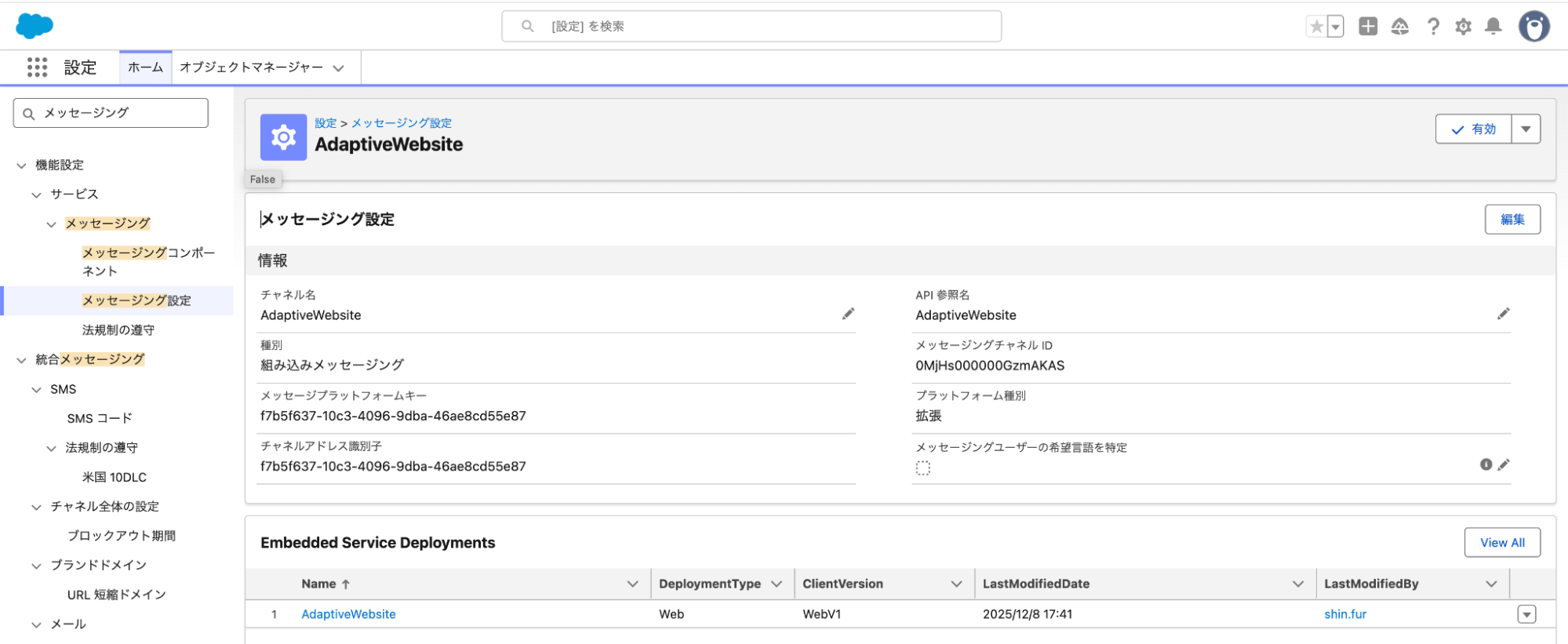
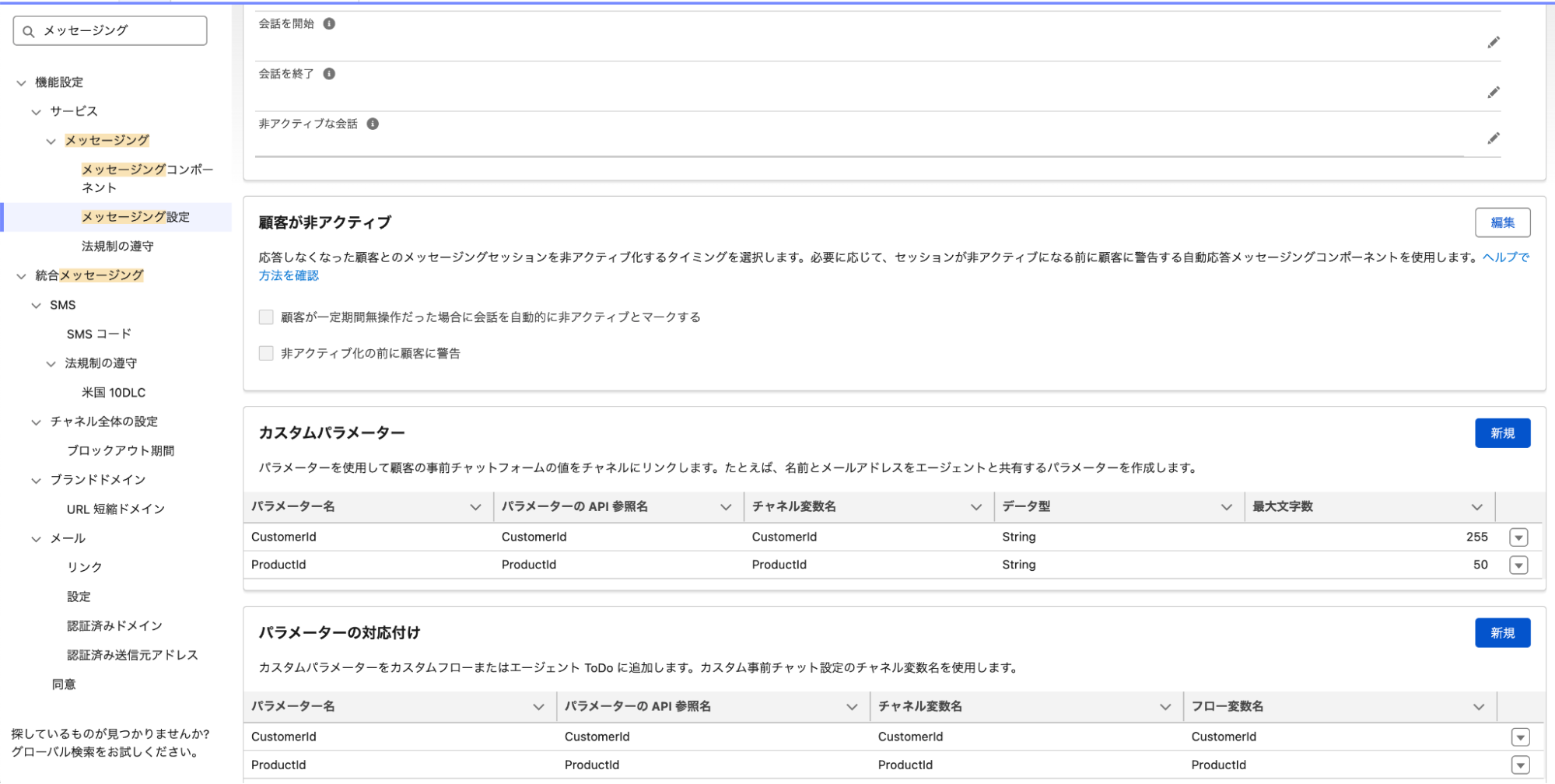
次に[すべてのサイト]から作成済みのサイトの[詳細][ヘッドマークアップを編集]します。
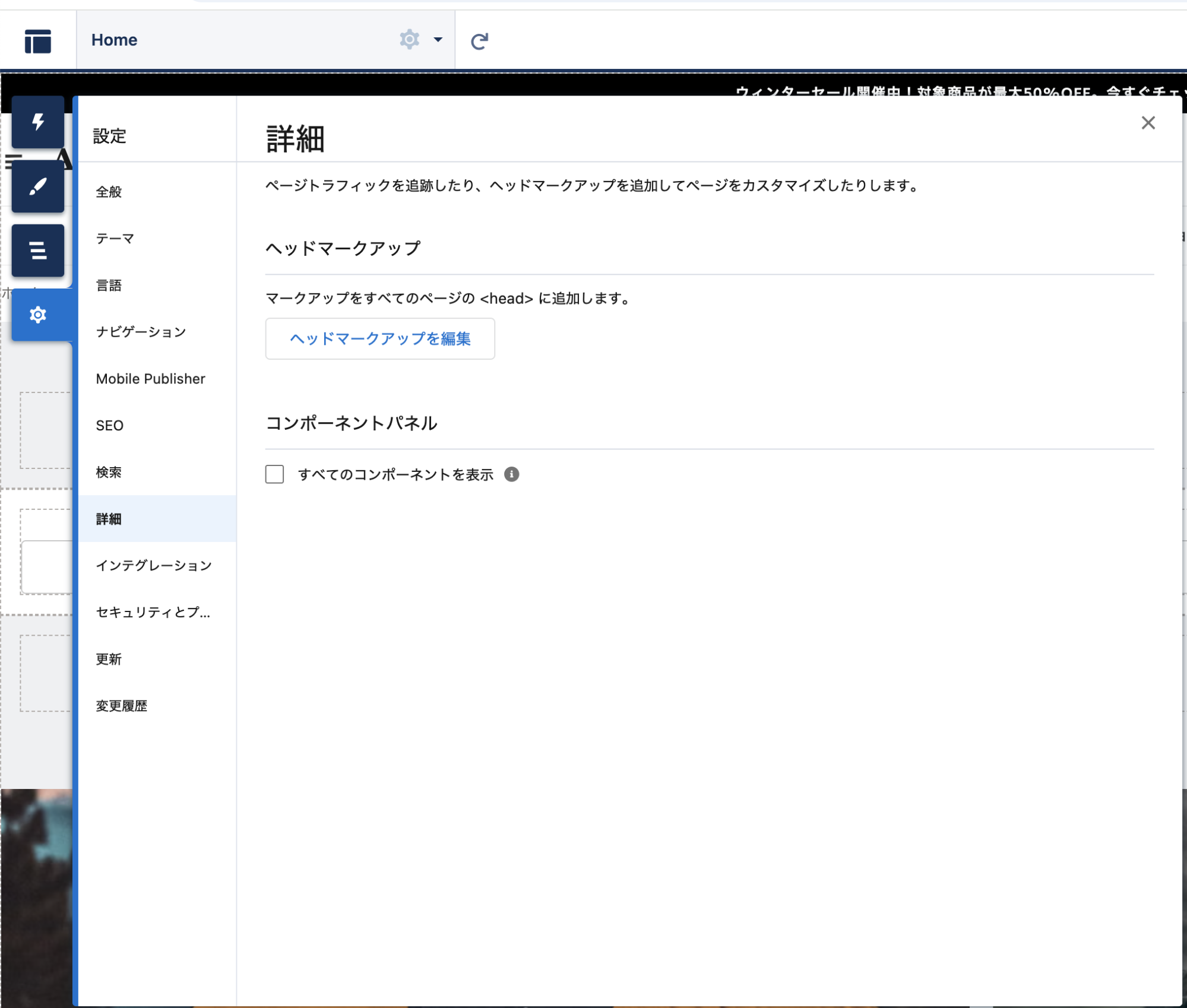
Pre-Chat変数にCustomerId・ProductIdをセットする以下のコードを挿入します。
<script>
    window.addEventListener("onEmbeddedMessagingReady", () => {

        console.log("Agentforce/MIAW is ready.");

        // --- 1. URLパラメータの取得とセット (既存の処理) ---
        const urlParams = new URLSearchParams(window.location.search);
        const cId = urlParams.get('customer_id');
        const pId = urlParams.get('product_id');

        let hiddenFields = {};

        if (cId) hiddenFields["CustomerId"] = cId;
        if (pId) hiddenFields["ProductId"] = pId;

        try {
            if (Object.keys(hiddenFields).length > 0) {
                embeddedservice_bootstrap.prechatAPI.setHiddenPrechatFields(hiddenFields);
                console.log("Hidden fields set.");
            }
        } catch(e) {
            console.log('Error setting prechat fields: ' + e.message);
        }

        // --- 2. ★追加: チャットウィンドウを自動で開く ---
        // 少しだけ(0.5秒〜1秒)待ってから開くと、挙動が安定し、かつユーザーにも「何か始まった」と伝わりやすいです
        setTimeout(() => {
            embeddedservice_bootstrap.utilAPI.launchChat()
                .then(() => {
                    console.log("Chat auto-launched successfully.");
                })
                .catch((error) => {
                    console.error("Failed to auto-launch chat:", error);
                });
        }, 1000); // 1000ミリ秒 = 1秒後にオープン

    });
</script>
変数にセットされた値をAgentに引き渡せるよう、Omni Channel Flowを編集します。
リソースとしてCustomerId、ProductIdを作成し、ここにセットされた値をメッセージングセッションオブジェクトに記録します。オブジェクトに記録しておくことで、Agentが見つけやすくなります。
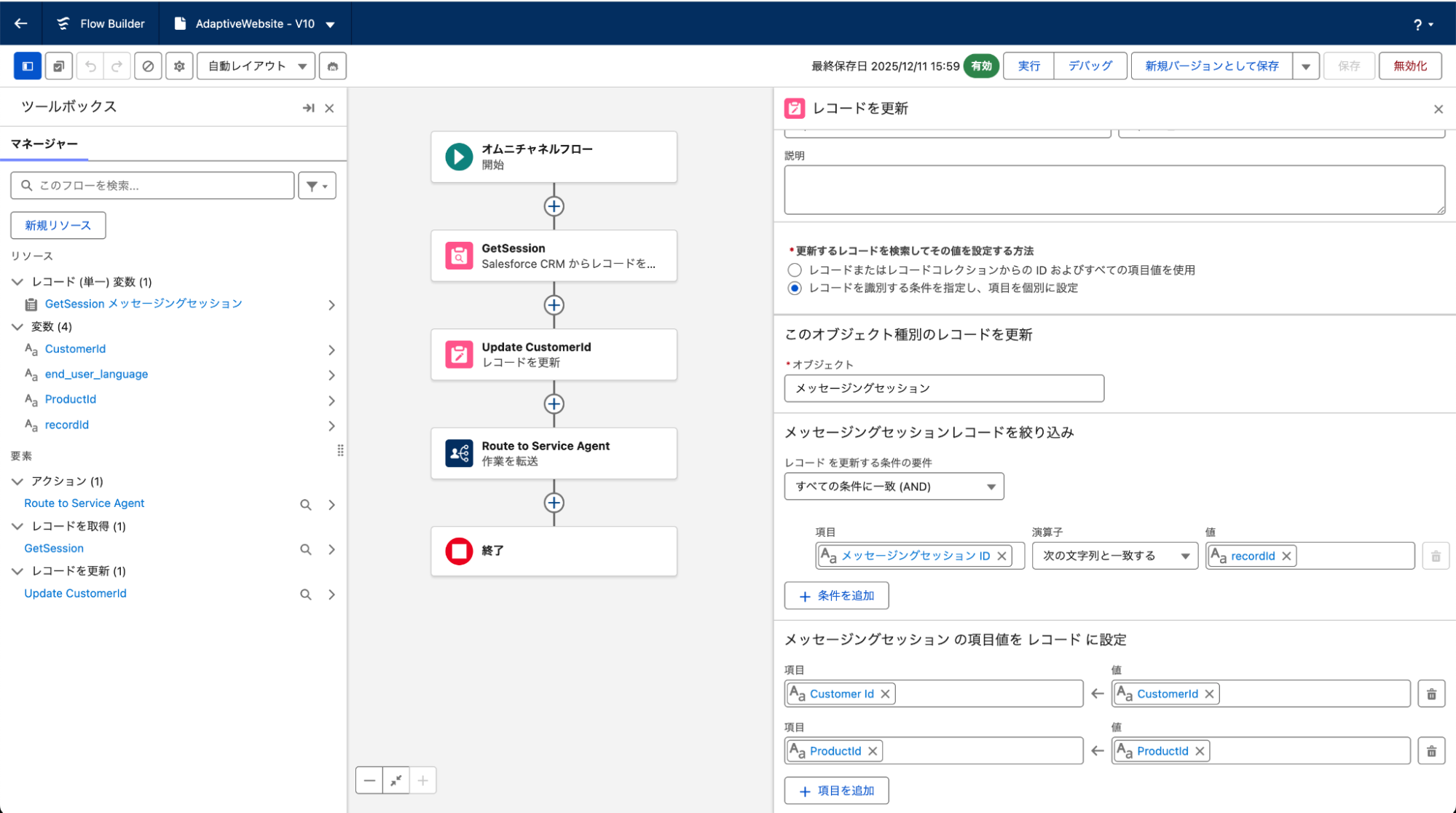
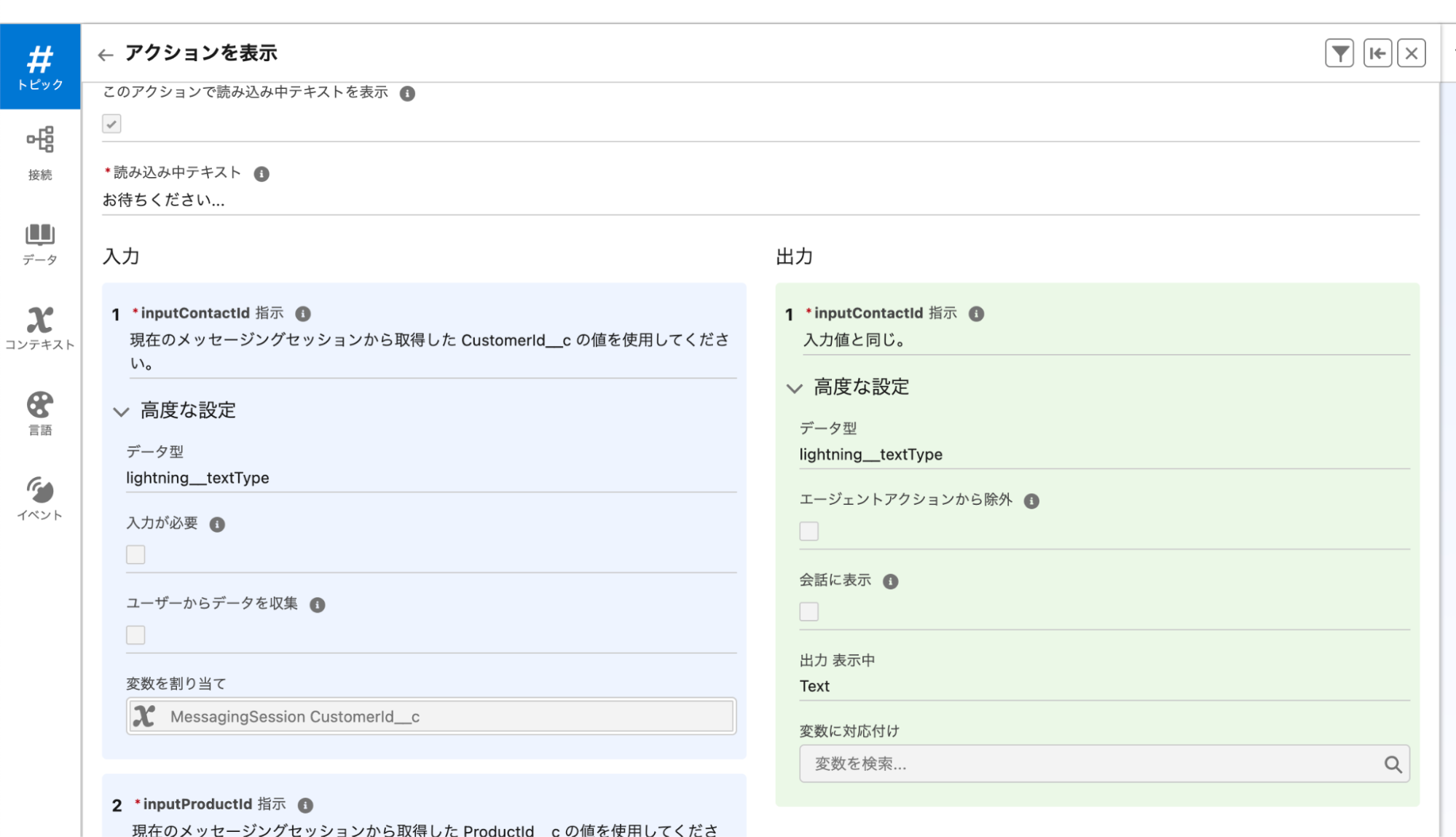
メッセージングセッションオブジェクトに記録することで、下の画像のようにメッセージングセッションオブジェクトのCustomerIdをインプットとして使ってね、とAgentに明示指定できるようになります。
[変数を割り当て]の[MessagingSession CustomerId__c]箇所。
> Agentforce Marketingで近未来の顧客体験デモを作ってみた【4】につづく
関連セミナー
関連情報
- Share
-
-



CONTACT
ご依頼・ご相談など、お問い合せはこちら